
Prevent Printing Issues Caused by Dry Paper
When fall and winter arrive and heating systems start running, indoor air becomes much drier. Low humidity can remove moisture from printer paper, which may cause several common printing problems. Keeping paper in proper condition can help prevent printer downtime and frustration.
Common Problems Caused by Dry Paper
• Frequent paper jams
• Multiple sheets feeding at once
• Skewed or misaligned prints
• Wrinkled or curled paper
• Static causing sheets to stick together
• Printer failing to pick up paper from tray
• Inconsistent print quality
How to Prevent Dry Paper Issues
- Keep Paper Sealed
Store paper in its original packaging until it is needed to prevent moisture absorption. - Store Paper in a Dry Area
Avoid storing paper near
• Heating vents
• Radiators
• Exterior walls
• Windows
Keep paper in a climate-controlled area whenever possible. - Fan Paper Before Loading
Lightly fan the paper stack to separate sheets and reduce sticking. - Avoid Overloading the Tray
Load only up to the recommended fill line to prevent feeding issues. - Rotate Paper Stock
Use older paper first and avoid leaving opened reams exposed to humid air for extended periods.
Proper Paper Loading
Step 1 — Align the Paper
Ensure the paper stack is straight and evenly aligned.
Step 2 — Load Below the Fill Line
Do not exceed the MAX fill indicator in the tray.
Step 3 — Adjust Paper Guides
Slide guides so they rest gently against the paper without bending it.
If Paper Appears Dry
- Remove the paper stack from the tray
- Gently fan and flex the paper to release static
- Reload the paper evenly into the tray
- If issues continue, use a newly opened ream
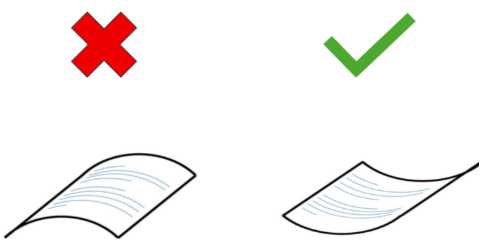
- If paper exhibits a curl but must be used, load according to following illustration
Low humidity is the most common cause of winter paper handling issues.